
Empowering Developers for Seamless Collaboration with GitHub Tools

Empowering Developers for Seamless Collaboration with GitHub Tools

GitHub has evolved from a Git hosting service into a comprehensive developer platform offering issue tracking, CI/CD (GitHub Actions), package registry, code scanning, project management, and wiki documentation. These integrated tools streamline the entire software development lifecycle within a single interface, reducing context switching and enabling seamless collaboration for distributed teams.

GitHub Issues and Project Management

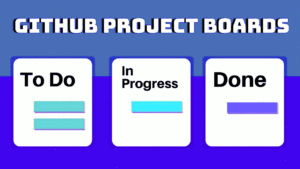
GitHub Issues track bugs, feature requests, and tasks with labels, assignees, milestones, and linked pull requests. The modern issue experience includes issue templates (standardized formats for bug reports and feature requests), issue forms (structured YAML-defined forms with validation), and task lists within issues for tracking sub-tasks. GitHub Projects provides a Kanban-style board that automatically syncs with issues and PRs, supporting custom workflows with status fields, iterations, and insights dashboards. Automations can move cards between columns based on label changes, PR merges, or scheduled dates, reducing manual board management.

# Using GitHub CLI to manage issues
gh issue create --title "Add dark mode" --body "Users have requested a dark theme..."   --label enhancement --assignee @me --project "Q3 Sprint"

gh issue list --label bug --assignee @me
gh issue view 42  # View issue details in terminal

# Link PR to issue automatically (mention in PR description)
# Closes #42 — PR will auto-close the issue when merged

GitHub Actions for CI/CD

GitHub Actions provides workflow automation triggered by GitHub events (push, PR, schedule, issue creation). Workflows are YAML files in .github/workflows/ that define jobs running on GitHub-hosted or self-hosted runners. Each job consists of steps that can run commands or use pre-built actions from the Marketplace. Common workflows include running tests on every push, deploying to cloud platforms on merge to main, publishing packages to npm or Docker Hub on version tags, and scheduled tasks like dependency updates or database backups.

# .github/workflows/ci.yml
name: CI
on: [push, pull_request]
jobs:
  test:
    runs-on: ubuntu-latest
    steps:
      - uses: actions/checkout@v4
      - uses: actions/setup-python@v5
        with: { python-version: "3.12" }
      - run: pip install -r requirements.txt
      - run: pytest --cov=src --cov-report=xml
      - uses: codecov/codecov-action@v4
  deploy:
    needs: test
    if: github.ref == 'refs/heads/main'
    runs-on: ubuntu-latest
    steps:
      - uses: actions/checkout@v4
      - uses: superfly/flyctl-actions@1.5
        with: { args: "deploy" }
        env: { FLY_API_TOKEN: ${{ secrets.FLY_API_TOKEN }} }

Code Review with Pull Requests

GitHub’s pull request interface supports inline code comments, suggested changes (one-click accept), draft PRs (mark work-in-progress without triggering CI), and required reviewers with branch protection rules. Review assignment can be automatic (code owners file, load balancing round-robin). Conversation resolution tracks when comments are addressed. The Checks tab shows CI status directly in the PR. Merge queues (GitHub Merge Queue) automatically test PRs in batches before merging, ensuring main is always green even with concurrent merges. For security-sensitive projects, CODEOWNERS can enforce that specific files require review from designated teams.

Security Features

Dependabot automatically scans dependencies for known vulnerabilities (from GitHub Advisory Database) and creates PRs to update them. Secret scanning detects exposed credentials (API keys, tokens, passwords) in repositories and alerts the security team. CodeQL analysis runs static analysis on every push, finding security vulnerabilities (SQL injection, XSS, path traversal) and code quality issues. SBOM (Software Bill of Materials) generation outputs a machine-readable inventory of all dependencies, helping with supply chain security compliance. These security features, combined with mandatory 2FA enforcement and SAML/SSO for organizations, make GitHub a secure platform for enterprise development teams.

GitHub Actions Advanced Patterns

GitHub Actions supports matrices (running the same job with different OS or language versions), reusable workflows (calling a workflow from another workflow, avoiding duplication), environments (with approval gates and secrets scoped to deployment targets), and composite actions (bundling multiple steps into a reusable action). For monorepos, paths filtering triggers workflows only when specific directories change. The concurrency group prevents duplicate workflow runs on the same branch. Workflow commands allow creating annotations, setting outputs, and updating the job summary from within script steps. Artifact and cache actions speed up builds by persisting dependencies between runs. For self-hosted runners, autoscaling with actions-runner-controller on Kubernetes provides enterprise-level capacity management.

# Matrix testing across Python versions and OS
jobs:
  test:
    strategy:
      matrix:
        os: [ubuntu-latest, macos-latest, windows-latest]
        python: ["3.9", "3.10", "3.11", "3.12"]
    runs-on: ${{ matrix.os }}
    steps:
      - uses: actions/setup-python@v5
        with: { python-version: ${{ matrix.python }} }
      - run: pip install . && pytest

GitHub Pages and Documentation

GitHub Pages hosts static websites directly from repositories, supporting Jekyll, Hugo, and plain HTML. Project pages (served from a gh-pages branch or /docs folder) provide free documentation hosting with custom domain support and automatic HTTPS. Pages integrates with Actions: build your static site generator, deploy the output to Pages, and invalidate the CDN cache automatically. GitHub Wikis provide collaborative documentation that anyone with repository access can edit, with version history and search. For API documentation, GitHub’s support for OpenAPI/Swagger renders specification files directly in the repository view. Combined with the GitHub REST API and GraphQL API, you can automate documentation generation and maintain a project website without leaving the GitHub ecosystem.
Git Basics: From First Commit to Collaboration

Git Basics: From First Commit to Collaboration

Git is the most widely used version control system, tracking changes in files across a distributed network of repositories. Unlike centralized systems (SVN, CVS), Git stores the complete history locally, enabling offline work, fast operations, and flexible branching models. This article covers the essential Git commands and concepts every developer must know.

The Three States and Basic Workflow

Git has three main states for files: modified (changed but not staged), staged (marked for the next commit), and committed (saved to the local repository). The working directory holds modified files, the staging area (index) holds staged changes, and the .git directory stores committed history. The basic cycle is: edit files in the working directory, use git add to stage changes, and git commit to save them to history. git status shows the current state, and git diff shows unstaged changes.

# Initialize a new repository
git init my-project
cd my-project

# Create and commit a file
echo "# My Project" > README.md
git status                    # Shows README.md as untracked
git add README.md             # Stage the file
git commit -m "Initial commit with README"
git log --oneline             # View commit history

Branching and Merging

Branches are lightweight pointers to specific commits. Creating a branch is instantaneous because Git simply creates a new pointer (41 bytes) rather than copying files. The default branch is named main (or master in older repositories). Feature branches isolate work until it is ready. Merging integrates changes from one branch into another—Git either fast-forwards (if there is no divergent work) or creates a merge commit (if branches have diverged). Merge conflicts occur when the same part of a file was modified in both branches and must be resolved manually.

# Branch workflow
git checkout -b feature/login   # Create and switch to new branch
# ... make changes, commit ...
git add . && git commit -m "Add login form"
git checkout main               # Switch back to main
git merge feature/login         # Merge feature into main
git branch -d feature/login     # Delete the feature branch

# Handle a merge conflict
# Edit the conflicted file to resolve
git add resolved-file.txt
git commit -m "Merge feature/login: resolved conflict"

Remote Repositories and Collaboration

Remote repositories (on GitHub, GitLab, Bitbucket) enable collaboration. git clone downloads a remote repository. git push uploads local commits, and git pull fetches and merges remote changes. git fetch downloads remote data without merging, giving you a chance to review changes before integrating. The origin remote is created automatically when cloning. Pull requests (GitHub) or merge requests (GitLab) are code review mechanisms built on top of Git’s branch model—they propose merging a feature branch into main after review and CI validation.

# Working with remotes
git clone https://github.com/user/repo.git
cd repo
git remote -v                   # List remotes
git pull origin main            # Fetch and merge remote changes
git push origin feature-branch  # Push branch to remote

# Undo and amend
git commit --amend -m "Better message"  # Fix last commit message
git reset HEAD~1                 # Uncommit last commit (keep changes)
git reset --hard HEAD~1          # Discard last commit and changes

Ignoring Files and .gitignore

Not all files should be committed—build artifacts (node_modules, target, build/), environment files (.env), IDE settings (.vscode/), and operating system files (.DS_Store) should be excluded via .gitignore. GitHub provides templates for different languages and frameworks. Once a file is tracked by Git, adding it to .gitignore does not stop tracking—you must use git rm –cached to untrack it. Git hooks (pre-commit, pre-push) automate checks like linting, formatting, and running tests before commits or pushes, enforcing code quality standards across the team.

Git Internals: Objects and References

Understanding Git’s internal data model demystifies many Git behaviors. Git stores everything as objects in .git/objects/: blobs (file contents), trees (directory listings mapping filenames to blobs or sub-trees), commits (snapshot pointers with metadata), and annotated tags (named commit references with messages). Each object is identified by its SHA-1 hash (40 hex characters). Branches are simple files in .git/refs/heads/ containing a commit hash—creating a branch is literally writing 41 bytes to a file. The HEAD file points to the current branch or directly to a commit (detached HEAD). When you run git add, Git creates blob objects for the file contents and updates the index (staging area). When you run git commit, Git creates a tree object from the index and a commit object pointing to that tree. Understanding this object model explains why git operations are so fast—they are just file operations on hashed content.

# Exploring Git internals
git cat-file -p HEAD  # Show the current commit object
git ls-tree HEAD      # Show the tree at HEAD
git cat-file -p $(git ls-tree HEAD | grep README | awk '{print $3}')
# This shows the blob content for README at HEAD

Linux Powers Web Evolution

Linux Powers Web Evolution

Linux is the operating system that powers the modern web. From the servers that host websites to the cloud infrastructure that runs SaaS applications, Linux dominates the server market with over 96% market share among the top one million websites. This dominance is not accidental—Linux offers stability, security, flexibility, and cost-effectiveness that proprietary operating systems cannot match for web infrastructure.

The LAMP Stack and Its Legacy

The LAMP stack (Linux, Apache, MySQL, PHP/Python/Perl) has been the foundation of web development for over two decades. Linux provides the operating system layer with robust process isolation, file permissions, and networking. Apache HTTP Server handles HTTP requests with modules for URL rewriting, authentication, load balancing, and SSL termination. MySQL (or MariaDB) stores relational data, and the scripting language generates dynamic content. While modern stacks often replace Apache with Nginx, MySQL with PostgreSQL, and add Node.js, Redis, and Docker, the Linux foundation remains constant.

# Typical LAMP server setup on Ubuntu
apt update && apt install -y apache2 mysql-server php libapache2-mod-php

# Replace Apache with Nginx for better performance
apt install -y nginx php-fpm mysql-server

# Nginx config for a PHP application
server {
    listen 80;
    server_name example.com;
    root /var/www/html;
    index index.php index.html;
    location / {
        try_files $uri $uri/ /index.php?$args;
    }
    location ~ \.php$ {
        include snippets/fastcgi-php.conf;
        fastcgi_pass unix:/var/run/php/php8.1-fpm.sock;
    }
}

Linux as the Cloud Foundation

Every major cloud platform—AWS, Google Cloud, Azure, DigitalOcean, Linode—runs Linux as the primary operating system for their virtual machines and container services. AWS’s EC2 instances, Google Compute Engine VMs, and Azure Virtual Machines all support Linux images that boot in seconds and scale to thousands of cores. Linux’s container story is unmatched: Docker runs natively on Linux using kernel namespaces and cgroups, and Kubernetes orchestrates containers at scale across clusters. The entire cloud-native ecosystem (Terraform, Prometheus, Grafana, Envoy, etcd) runs on Linux first.

# Install Docker on Linux
apt install -y docker.io docker-compose-v2
systemctl enable --now docker

# Run a containerized web app
docker run -d --name myapp -p 8080:80 nginx:alpine

# Deploy with Kubernetes (minikube for local testing)
kubectl create deployment web --image=nginx:alpine
kubectl expose deployment web --port=80 --type=LoadBalancer

Security and Reliability Advantages

Linux’s security model—discretionary access control, user/group permissions, capability-based security, and mandatory access control via SELinux or AppArmor—provides defense in depth for web applications. Regular security updates through package managers (apt, yum) and the ability to apply kernel live patches without rebooting minimize downtime. The principle of least privilege is built into the system: web servers run as the www-data user with limited permissions, and systemd sandboxing restricts service capabilities. Linux servers with proper configuration have uptimes measured in years, and the modular kernel allows loading only the drivers and modules needed for the specific workload.

The DevOps Ecosystem

Linux is the native environment for DevOps tooling. CI/CD pipelines (Jenkins, GitLab CI, GitHub Actions) run on Linux agents. Configuration management (Ansible, Puppet, Chef) targets Linux servers. Infrastructure as code (Terraform, Pulumi) provisions Linux resources. Monitoring and observability (Prometheus, Grafana, ELK Stack) are Linux-native. The terminal-centric culture of Linux enables automation through shell scripts, cron jobs, and systemd timers. For web developers, understanding Linux—file permissions, process management, systemd units, network configuration, and package management—is not optional; it is essential for deploying and operating web applications in production.

Server Hardening Best Practices

Securing a Linux web server requires multiple layers: fail2ban blocks IPs after repeated failed SSH login attempts; unattended-upgrades installs security patches automatically; UFW or iptables restricts ports to only what is needed (22/SSH, 80/HTTP, 443/HTTPS); SSH key authentication replaces passwords; and regular log review (journalctl, /var/log/auth.log, /var/log/nginx/access.log) detects intrusion attempts. The CIS Benchmarks provide detailed hardening guidelines for each Linux distribution. SELinux (CentOS/RHEL) or AppArmor (Ubuntu/Debian) enforces mandatory access control policies that limit what compromised processes can access, providing defense in depth. Regular vulnerability scanning with tools like Lynis or OpenVAS identifies configuration weaknesses before attackers do. A hardened Linux server, properly configured and maintained, can run for years without security incidents even when exposed to the open internet.

Linux Distribution Choices for Web Servers

Ubuntu Server LTS (released every two years in April) is the most popular Linux distribution for web servers, offering a balance of stability and up-to-date packages. Debian Stable prioritizes stability above all else—packages are older but thoroughly tested. CentOS Stream tracks between Fedora and RHEL, suitable for enterprise environments requiring RHEL compatibility without a subscription. Alpine Linux, at under 5 MB base install size, is the most popular Docker base image—its musl libc and busybox utilities produce minimal attack surfaces and fast build times. For ARM-based servers (AWS Graviton, Raspberry Pi), Ubuntu Server and Debian offer excellent ARM support. All these distributions share the Linux kernel and GNU tools, so skills transfer between them.

Empowering e-Governance in India: NIC Support for Government Websites

Empowering e-Governance in India: How the National Informatics Centre Supports Government Websites

The National Informatics Centre (NIC) is India’s premier government IT organization, responsible for building and maintaining the digital infrastructure that powers government services. Established in 1976, NIC has evolved from a small computing center to a vast network connecting over 40,000 government offices across India. This article explores how NIC supports government websites, including those serving health programs, and its role in India’s e-governance transformation.

NIC’s Infrastructure and Services

NIC provides end-to-end ICT services to the Indian government: domain registration (gov.in), web hosting, email services (gov.in mail), video conferencing (NIC VC), data center operations, and cybersecurity. NIC’s National Cloud (MeghRaj) hosts over 15,000 government applications across 30+ states. The network infrastructure (NICNET) connects district headquarters, state capitals, and national ministries through a secure MPLS-based network with redundancy and failover. For government websites, NIC provides standardized content management systems, SSL certificates, load balancing, DDoS protection, and 24/7 monitoring—allowing ministries to focus on content rather than infrastructure management.

# Simulated NIC dashboard monitoring
import random, datetime

sites = {
    "health.nic.in": {"uptime_24h": 99.97, "requests_per_sec": 450},
    "covid19.nic.in": {"uptime_24h": 100.0, "requests_per_sec": 1200},
    "mohfw.gov.in": {"uptime_24h": 99.95, "requests_per_sec": 890},
    "nhm.nic.in": {"uptime_24h": 99.99, "requests_per_sec": 230},
}

for site, metrics in sites.items():
    status = "HEALTHY" if metrics["uptime_24h"] > 99.9 else "WARNING"
    print(f"{site:25} | Uptime: {metrics['uptime_24h']}% | "
          f"RPS: {metrics['requests_per_sec']:>4} | {status}")

Health Program Websites Powered by NIC

NIC hosts and maintains key health program websites: the Ministry of Health and Family Welfare (mohfw.gov.in), the National Health Mission (nhm.nic.in), the Integrated Disease Surveillance Programme (idsp.nic.in), and the COVID-19 dashboard (covid19india.org, initially hosted on NIC infrastructure). These sites handle millions of daily visits, especially during health emergencies. The COVID-19 pandemic demonstrated NIC’s capacity to scale rapidly—the national vaccine registration portal (CoWIN) was built, deployed, and scaled to handle 10+ million daily transactions within weeks, all on NIC infrastructure. NIC also provides technical assistance for state-level health department websites, ensuring consistent security standards and accessibility compliance.

Standardization and Security

NIC enforces security standards across all government websites: mandatory HTTPS (all gov.in sites are HTTPS-only), regular vulnerability assessments, web application firewall protection, and compliance with the Indian Cyber Security Framework. The NIC Guidelines for Government Websites mandate responsive design (mobile-first), accessibility (WCAG 2.1 compliance for differently-abled users), multilingual support (English + Hindi + regional language), and performance benchmarks (page load under 3 seconds on 2G connections). NIC’s centralized approach ensures that even small district health departments benefit from enterprise-grade security and infrastructure that would be prohibitively expensive to procure independently.

The NIC e-Governance Stack

Beyond websites, NIC provides a comprehensive e-governance application stack: the e-Office suite (digital file processing, e-signatures, document management), the Public Financial Management System (budget tracking and expenditure monitoring), the e-Hospital application (hospital management, appointment scheduling, lab integration), and the Aadhaar-enabled services layer (biometric authentication for health schemes). The Unified Mobile Application for New-age Governance (UMANG) provides a single mobile access point for 1200+ government services. NIC’s role has shifted from pure infrastructure provider to platform builder, enabling rapid development of digital health services through reusable components and APIs.

NIC’s Response During the COVID-19 Pandemic

The COVID-19 pandemic was a defining moment for NIC’s infrastructure capabilities. The CoWIN vaccine registration platform, built and operated by NIC, handled over 1 billion vaccination registrations with peak loads of 10 million transactions per hour. The platform integrated real-time inventory management across 200,000+ vaccination centers, SMS and WhatsApp notifications in 12 languages, digital certificate generation with QR codes, and interoperable APIs used by third-party apps. The COVID-19 India dashboard, initially hosted on NIC infrastructure before being open-sourced, provided real-time case tracking, testing data, and recovery rates at national, state, and district levels. These systems demonstrated that government-owned IT infrastructure can match or exceed private-sector capabilities when properly designed and resourced. NIC also developed the Aarogya Setu contact tracing app (with over 200 million downloads) and the e-Pass system for interstate travel during lockdowns, maintaining 99.9% uptime throughout the pandemic peaks.

Open Source Contributions by NIC

NIC has contributed significantly to open source software used globally. The COVID-19 India dashboard was open-sourced on GitHub and adapted by several other countries for their pandemic response. The CoWIN platform APIs were published as open specifications, enabling third-party innovation. NIC has contributed to the Drupal and WordPress ecosystems with government-specific modules and themes. The Open Government Data Platform India (data.gov.in), built on CKAN (an open source data portal), publishes over 50,000 datasets from government ministries. NIC developers have contributed patches to Nginx, Apache, PostgreSQL, and various Linux kernel drivers. This open source engagement reflects a shift in government IT strategy from vendor lock-in to building internal capability, using and contributing to open source, and developing reusable platforms that can be shared across states and ministries rather than building custom solutions for each department.

Important concepts for setting up websites.

Setting up a website can be an exciting and rewarding process, but it can also be daunting if you’re new to it. Here are 5 basic concepts to keep in mind when setting up a website:

  1. Domain Name: A domain name is the address of your website on the internet. It’s the name that people will type into their web browser to find your site. Choosing the right domain name is important as it can affect your website’s branding, search engine optimization, and overall success. Make sure the domain name you choose is relevant to your website’s content and easy to remember.
  2. Web Hosting: Web hosting is a service that allows you to store your website’s files and data on a server that’s accessible on the internet. When choosing a web hosting provider, consider factors such as reliability, uptime, security, and customer support. It’s important to choose a web hosting plan that meets your website’s needs and budget.
  3. Content Management System (CMS): A content management system is a software application that allows you to create, manage, and publish digital content. Popular CMS platforms include WordPress, Drupal, and Joomla. When choosing a CMS, consider factors such as ease of use, scalability, and community support.
  4. Website Design: The design of your website is important as it can affect user experience, engagement, and conversion rates. When designing your website, consider factors such as layout, typography, color scheme, and branding. Make sure your website is visually appealing, easy to navigate, and optimized for different devices and screen sizes.
  5. Search Engine Optimization (SEO): SEO is the process of optimizing your website to rank higher in search engine results pages (SERPs). This involves optimizing your website’s content, structure, and technical aspects to improve its visibility and relevance to search engines. When setting up your website, make sure to implement basic SEO practices such as keyword research, on-page optimization, and link building.

These are just a few basic concepts to keep in mind when setting up a website. As you delve deeper into the process, you’ll encounter more advanced concepts such as website analytics, e-commerce integration, and web security. However, understanding these basic concepts can help you lay a solid foundation for your website’s success.

When setting up an advance website, there are several important concepts to keep in mind, including the basic ones and the concept of dynamic website. For dynamic websites like Social Networking, Online Flight Ticket Booking etc., you’ll need to consider web development frameworks and must also know about the databases.

Web Development Frameworks: Web development frameworks provide a set of tools, libraries, and pre-built components that make it easier to develop dynamic websites. Popular web development frameworks include PHP (Laravel, CodeIgniter), Java (Spring, Hibernate), and Python (Django, Flask). When choosing a web development framework, consider factors such as ease of use, scalability, and community support.

Databases: Databases are used to store and manage website data such as user information, product catalogs, and website content. Popular databases for web development include MySQL, Oracle, and MongoDB. When choosing a database, consider factors such as data structure, scalability, and performance.

PHP is a popular server-side scripting language that is commonly used for web development. It has a large community of developers and a wide range of web development frameworks such as Laravel and CodeIgniter. MySQL is a popular database choice for PHP developers.

Java is another popular server-side programming language that is often used for enterprise web development. It has a wide range of web development frameworks such as Spring and Hibernate. Oracle is a popular database choice for Java developers.

Python is a versatile programming language that is often used for web development. It has a wide range of web development frameworks such as Django and Flask. MongoDB is a popular database choice for Python developers.

In summary, when setting up a website, it’s important to consider the basics such as domain name, web hosting, CMS, website design, and SEO. If you’re looking to build a dynamic website, you’ll need to consider web development frameworks, scripting languages and databases. By choosing the right tools and technologies, you can build a successful website that meets your needs and those of your users.

DNS Configuration and Domain Management

DNS translates domain names to IP addresses through a hierarchical system of name servers. Key record types include: A (IPv4 address), AAAA (IPv6 address), CNAME (canonical name—domain alias), MX (mail exchange), TXT (text records for verification and SPF), and NS (name server delegation). When setting up a website, configure A records pointing to your web server’s IP, CNAME records for www subdomain, MX records for email, and TXT records for domain ownership verification (Google Search Console, Microsoft 365) and email authentication (SPF, DKIM, DMARC). DNS propagation (changes spreading across global DNS servers) takes minutes to 48 hours depending on TTL (Time To Live) settings. For development, editing the local /etc/hosts file bypasses DNS entirely. Free DNS services (Cloudflare, AWS Route 53) also provide DDoS protection and CDN capabilities, making DNS configuration a critical part of website performance and security infrastructure.

# Check DNS records from command line
dig example.com A +short       # Get IPv4 address
dig example.com MX +short      # Get mail servers
nslookup example.com           # Query DNS information
whois example.com              # Domain registration details